


Devdocs guide
Using the GUI
Web Quickstart Guide
This tutorial will guide you through setting up your first experiment on the RagMetrics platform using the web interface, with no code. You’ll learn how to connect your LLM service, create a labeled dataset, and evaluate your model, all in a few simple steps. You can watch a video version from this LINK.
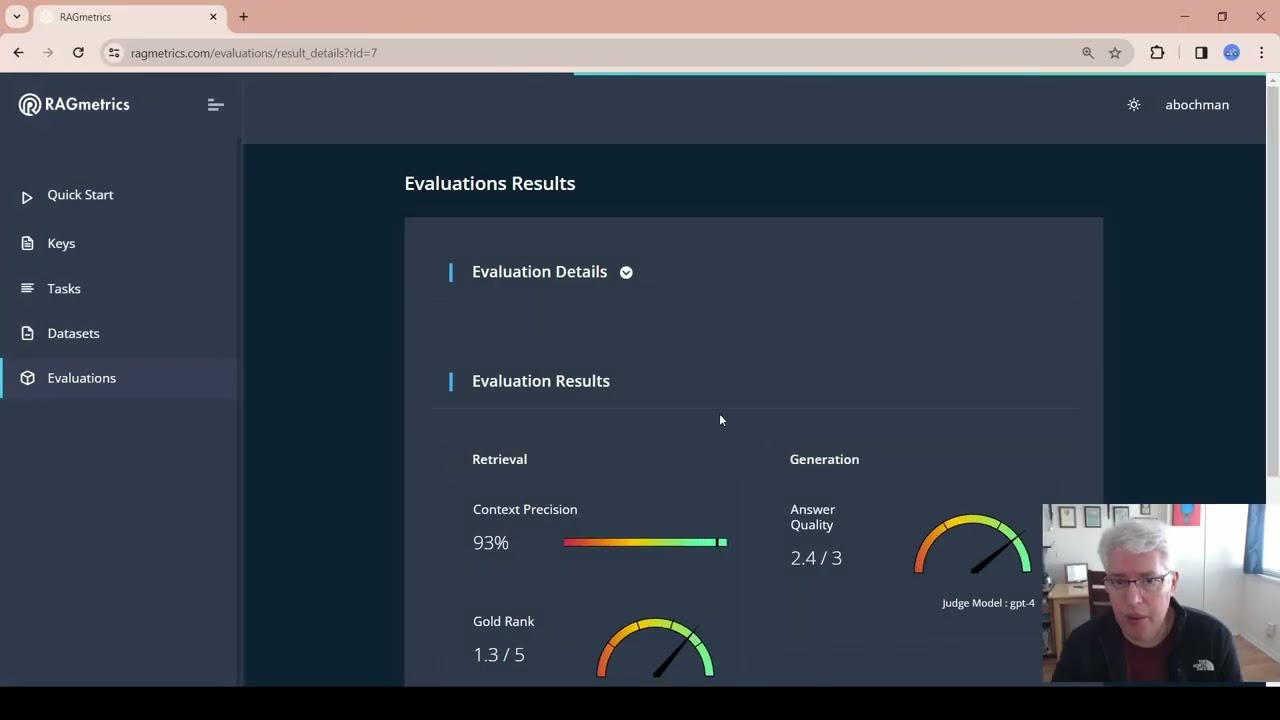
Introduction:
There are 5 steps to run an experiment and this guide will take you step by step. For a successful test, you need an LLM key that you can obtain from OpenAI, Gemini, or any other LLM Foundational Model. NOTE: Your key has to have enough token credits to run the experiments.
Step 1: Connect Your LLM Service
- Begin by linking RagMetrics to your LLM provider. For this tutorial, we’ll use OpenAI.
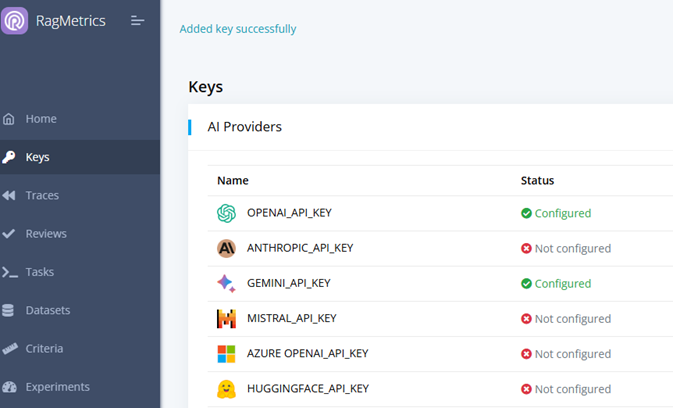
- Click on Keys, then add a key.
- Click on OpenAI.
- Provider your OpenAI key. Note: to get an OpenAI key, got to OpenAI website, Login, and access API Keys. If you have any questions check here [LINK] how to get one.

Step 2: Define Your Task
- Next, specify the task you’d like your LLM to perform.
- Create a Task
- Add Task Name
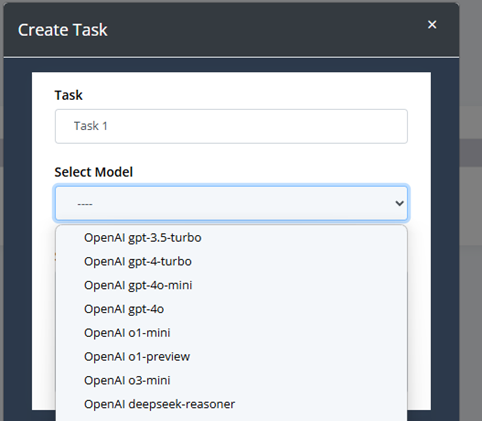
- Select the LLM Model: Use the model that corresponds to your KEY added in Step 1. We have pre-configured integrations for several models including GPT-4, Hugging Face, or other LLM providers. As soon as new models hit the market we will include them in our system.
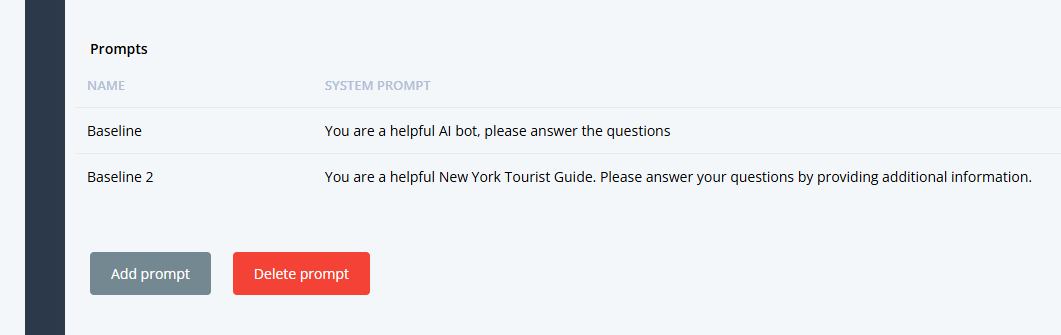
- Add a SYSTEM PROMPT, that would be the default prompt for your task. NOTE: It can be blank, or a basic prompt like “you are a helpful AI assistant”
- EXAMPLE: In this example, we will create a New York City Tour Guide.
- Your LLM will answer questions about New York City.
- The Task prompt could be “You are a helpful tourist guide to New York City”
Step 3: Create a Labeled Dataset
- The Dataset is a key component of the task as it is the source of the Experiment. A labeled dataset is essential for evaluating your LLM’s performance.
- You can create a dataset in 3 ways:
- Generated from CSV: You can upload a CSV file. The file has a specific format with 3 columns: Question, Answer, Context. You can download the CSV template right from the application. You then select the LLM model that you want to use to process the content and the number of questions you want the model to use for testing. NOTE: Default is 10
- Generated from Reference Docs: The reference docs could be a link (i.e. NYC Guide) or a document with specific content that you want to use as reference. You then select the LLM model that you want to use to process the content and the number of questions you want the model to use for testing. NOTE: Default is 10
- Generated Manually: Finally, you can also enter questions and answers manually, by adding them line by line.

- For our EXAMPLE, we’ll load reference documents from New York City’s Wikipedia page as shown above.
- Once the file/link is loaded, RagMetrics will automatically:
- Read the documents.
- Chunk the documents.
- Parse the documents.
- Embed the documents.
- Generate 10 questions based on the content.
- Generate 10 corresponding answers.
- Identify chunks of context within the documents that back up each answer.
- Here’s an example of possible questions generated:
- Question: “How has the location of New York City at the mouth of the Hudson River contributed to its growth as a trading post?”
- Ground Truth Answer: “The location of New York City at the mouth of the Hudson River has contributed to its growth as a trading port because it provides a naturally sheltered harbor and easy access to the Atlantic Ocean”.
- Ground Truth Context: A specific excerpt from the Wikipedia page that contains the ground truth answer.
Step 4: Evaluate Your Model
- Now it’s time to create EXPERIMENTS to evaluate how well your model performs on the created dataset.
- Create an Experiment:
- Enter the Experiment Name
- Select the TASK to use. NOTE: The Task to use should have been defined in Step 2
- Select the DATASET to use: NOTE: the Dataset to use should have been defined in Step 3
- Select the Experiment type: there are 2 types of experiments:
- Compare Models: you can select a group of LLM Foundational models to compare your task and choose which one might be the best for what you are looking for. It is interesting to see how the different models behave with different metrics.
- Compare Prompts: you can enter 2 or more prompts and compare the outcome of those. This is helpful to improve your prompt development.
Select the Evaluation Criteria: You can select criteria for Retrieval or for Generation. There are specific Criteria for each of the two categories. You can pick any number of criteria from a database of over 200, or you can create your own criteria by selecting Add New Criteria. Each criterion is evaluated either True or False or in a rank from 1 to 5 (5 being better)
- As an example let’s select “ACCURACY” and “SUCCINCTNESS”
- Run the EXPERIMENT:
- Generate answers to each of the questions in your dataset.
- Compare the generated answers to the Truth answers provided.
- Assess the context retrieval to see if the correct contexts were injected into the prompt.
- Provide results for each of the metrics.

- By clicking on each run number of the experiment you can see the details of each question and how it was rated.
- When you run the evaluation, RagMetrics will:
- Generate answers to each of the 10 questions in your dataset.
- Compare the generated answers to the gold answers.
- Assess the context retrieval to see if the correct contexts were injected into the prompt.
Step 5: Analyze the Results
- Once the evaluation is complete, you’ll see an overview of the results.
- The results will show:
- Context precision and gold rank scores, indicating how well the system retrieved the correct context.
- Answer quality score, indicating how well the model answered the questions.
- The cost of the evaluation.
- Downloadable details for a question-by-question breakdown.
- In this example, the answer quality score is 2.4 out of 3.
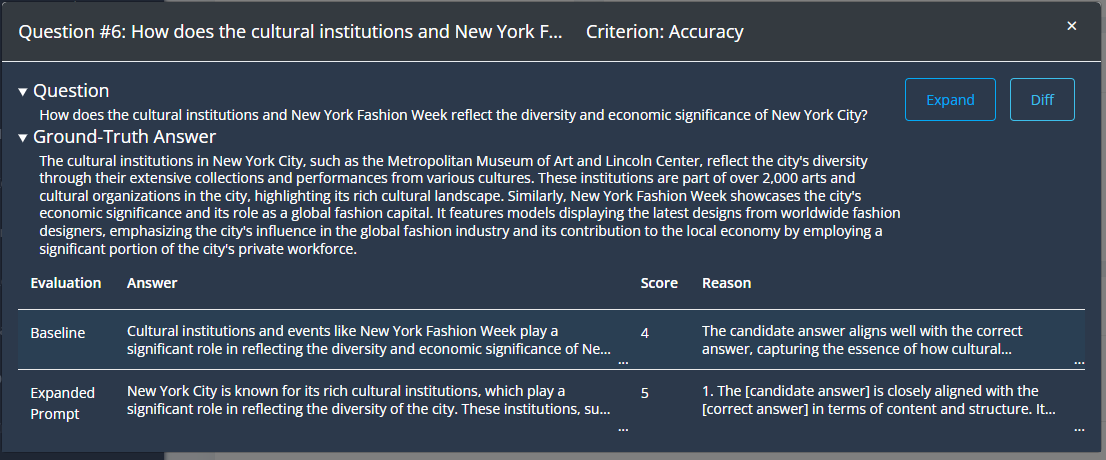
Step 6: Improve Your Model (Optional)
- If you’re not satisfied with the results, you can make changes and re-evaluate.
- For example, you could switch to a different model. As an example, you can switch the LLM Foundational Model from GPT 3.5 Turbo to GPT-4.
- You can then re-run the evaluation and see if there is any improvement.
- LLM configurations
- After the new evaluation, the context precision and gold rank remain the same, but the answer quality increases from 2.4 to 2.7.
Key Takeaways
- RagMetrics provides an easy way to test your LLM applications using labeled data.
- The platform automates the evaluation process and provides detailed insights that help you to make data-driven decisions to improve your application.
- You can test different models and prompts.
- You can evaluate the quality of context retrieval.
Next Steps
- Try other evaluation criteria.
- Try testing your own data and prompts.
- Book a demo with us to learn more.
This tutorial should provide you with a solid starting point for using RagMetrics to improve the quality of your LLM applications.
Monitor your LLM application
After you deploy your LLM application to production, use RagMetrics to monitor how your LLM pipeline is responding to your users:
Step 1: Log traces
First, add two lines to your Python code to log traces to RagMetrics: Getting Started: Log a trace (see API documentation)
Step 2: Create a review queue
In RagMetrics, a review queue is used for evaluating incoming traces both manually (human review) and automatically by LLM judges (online evaluation).

- Navigate to “Reviews”
- Click “Create Queue”
- Fill out the form. Here are the key fields:
- Condition: A search string. Incoming traces that include this string in either the
input,outputormetadatawill be included in this review queue. - Criteria: Traces included in this queue will be evaluated according to the criteria you select here.
- Judge Model: The LLM that will judge the traces.
- Dataset: For any trace in the queue, you can fix the actual output to the expected output and store it in a dataset. This dataset can then be used as a regression test, to evaluate your pipeline as you add new features.
- Condition: A search string. Incoming traces that include this string in either the
- Click “Save”
Step 3: Review a trace
Now that you have created a review queue, all traces that match the condition will be reviewed automatically, according to the criteria you selected. Let’s watch the queue in action:
- Log a new trace that matches the search condition.
- Click on the queue. You should now see the trace there.
- Click on the trace
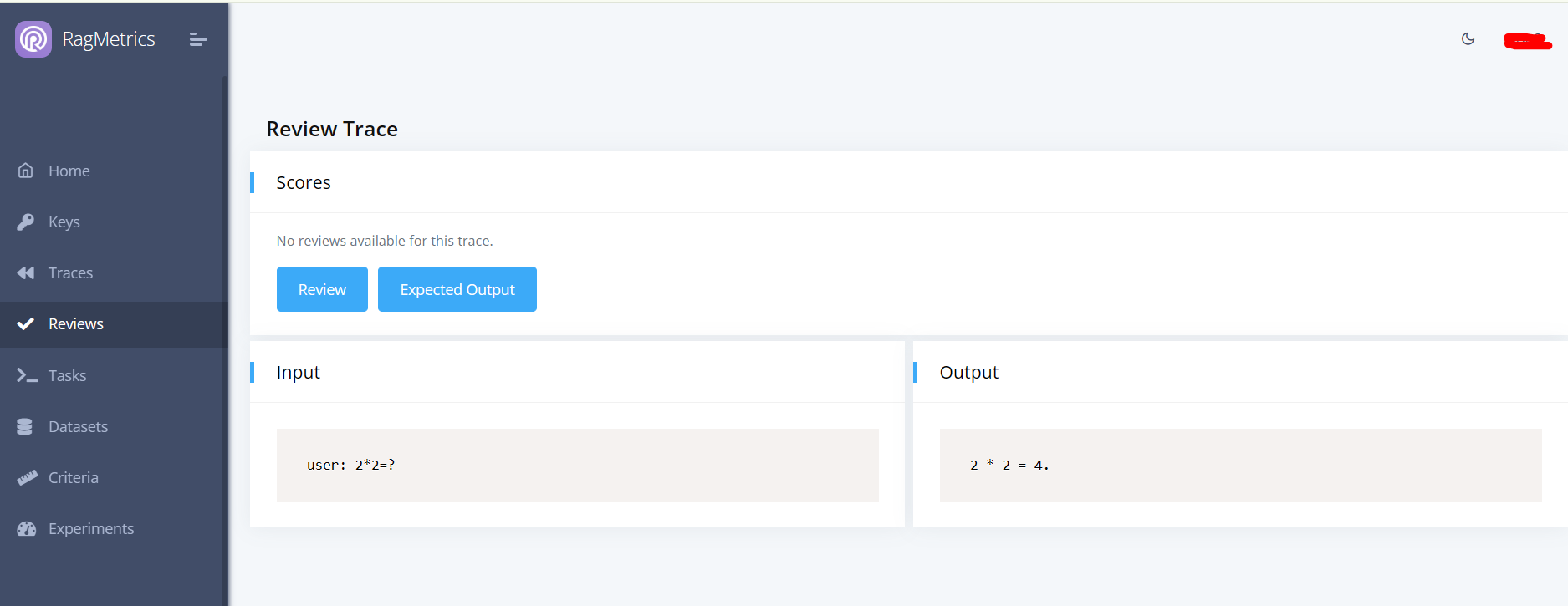
This is the trace review panel. Human and automatic reviews are shown in the “Scores” panel. The trace is shown in the “Input” and “Output” panels below.
As soon as the trace is logged, it will be automatically evaluated according to the criteria selected in the review queue. If the trace matches more than one queue, all criteria from all queues will be applied. Automated reviews can take a few minutes to complete. As soon as they are complete, the scores will be shown in the “Scores” panel.
Click “Review” to add a (human) review to the trace.
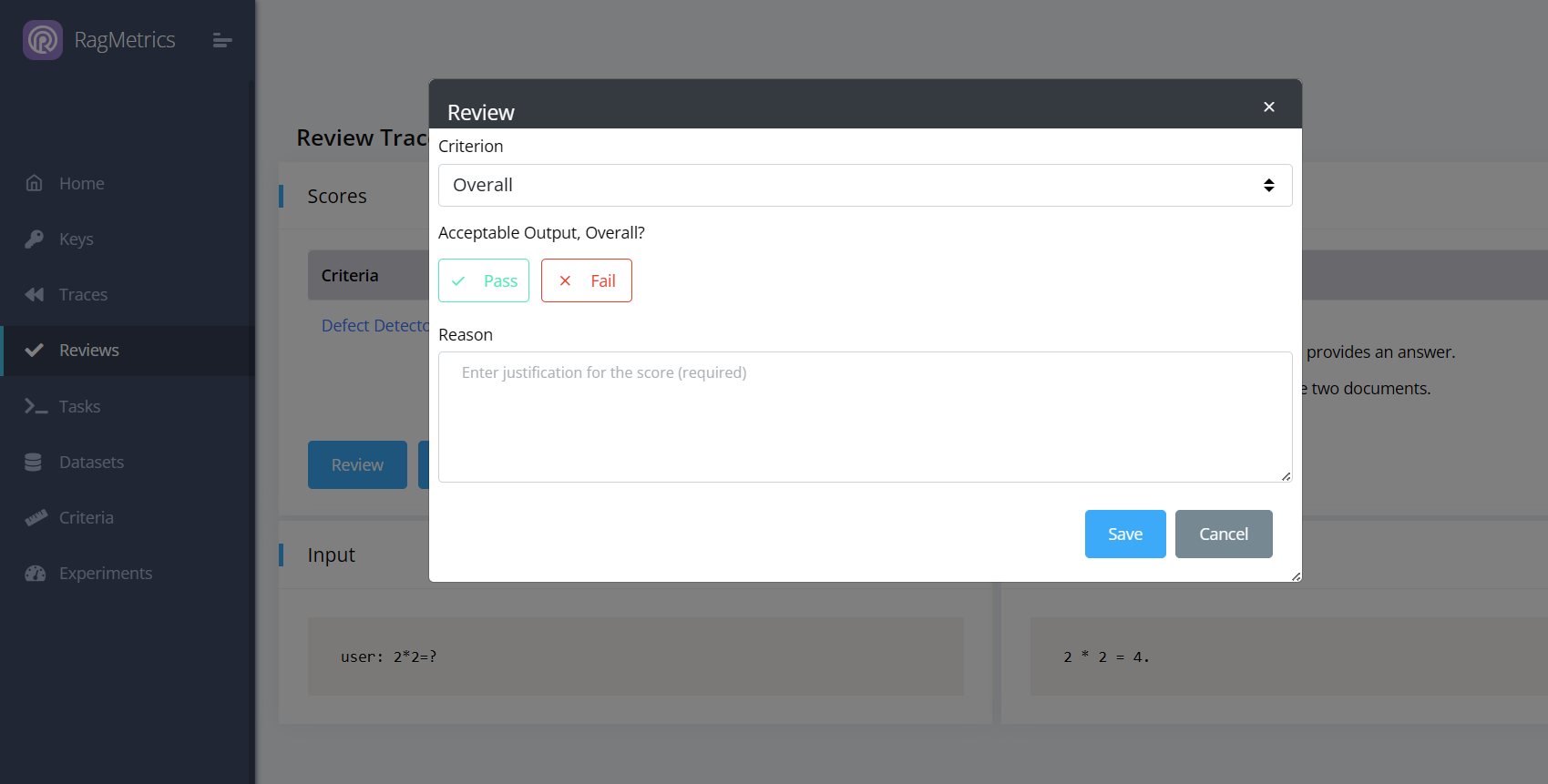
You can review the trace overall (pass/fail) or give feedback on one of automated scores. This feedback to the LLM judge can improve automated judgement over time.
Step 3: Set Expected Output
On the trace review page, click “Expected Output” to fix the output to the expected output and store it in a dataset. This dataset can then be used as a regression test, to evaluate your pipeline as you add new features. The dataset selector is on the bottom left of the expected output modal. It defaults to the dataset you selected when you created the review queue.
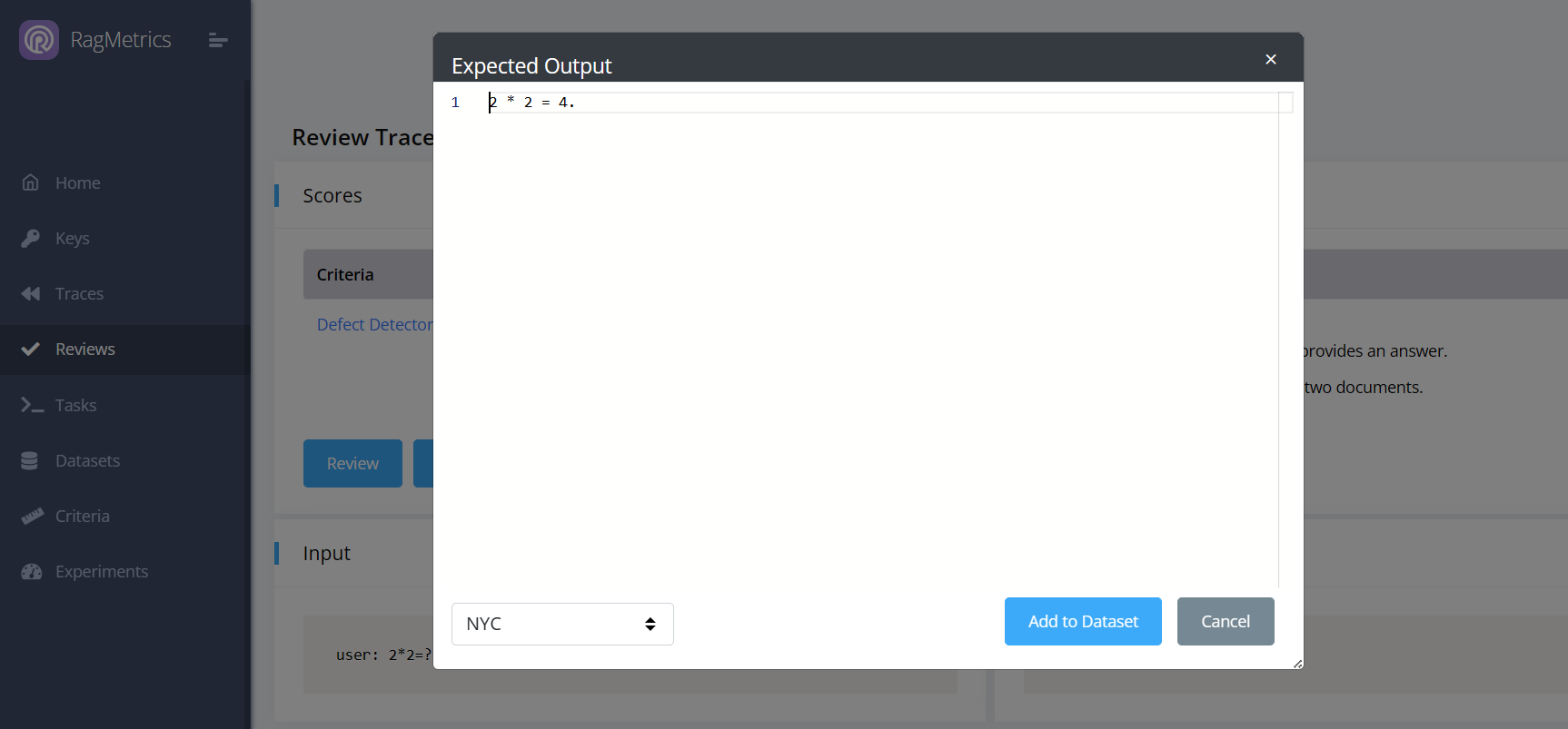
Note: You will be able to edit the expected output further on the dataset page.
Fix hallucinations
RagMetrics can help you discover and fix hallucinations in your LLM application. We define hallucinations as inconsistencies between the input and output. This feature works best for data extraction and parsing use cases, where the output is generated by parsing the input. To use this feature:
- Create a review queue
- In the criteria section, expand “Generation Criteria”
- Select “Hallucination Detector”
- For the Judge Model, we recommend a large reasoning model, such as OpenAI’s
o3-minior DeepSeek’sdeepseek-reasoner(make sure you have configured your OpenAI or DeepSeek key in the “Keys” section) - Save the review queue
- Log a trace to the queue
The hallucination detector shows a list of possible hallucinations. Click on a hallucinations to relevant highlights from the input and output. Here’s an example:

In this case, we can click “Expected Output” and fix the result from 7,056,652 to 7,006,652. We can then store this in the “multiplication” dataset which can be used to test whether our LLM app is good at multiplication.
Using the API
RagMetrics offers two APIs:
- Pull API: RagMetrics will pull data from your REST endpoint and evaluate the results. Experiment runs are triggered from the RagMetrics GUI.
- Push API: Your local Python code will push data to RagMetrics. Experiment runs are triggered from your Python code.
Pull API
In this API, RagMetrics connects to your code through a REST endpoint, provides input as if from a user, waits for your code to process it, collects the output and retrieved contexts and evaluates the results.
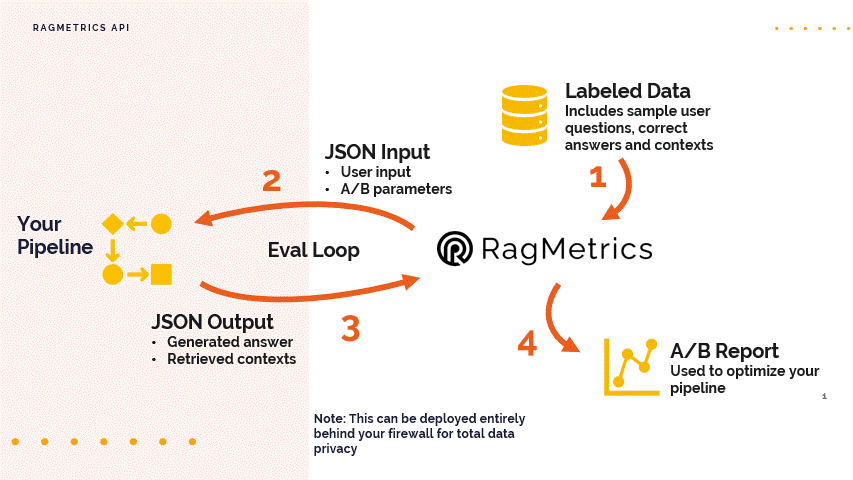
Step 1: Understand the Data Format
- The RagMetrics API uses JSON for both input and output.
- Labeled Data: Your labeled data set should include:
- Sample inputs or user questions that you would expect for your conversational AI bot.
- The correct answers that the system should deliver.
- Correct contexts or sources that are relevant to the answers.
- The API will take this data, one input at a time, and feed it into your pipeline.
- Input JSON: The input to your pipeline via the API should include:
- The question from your labeled data set.
- Any A/B test parameters that you want to use to switch between different parts of your code, like retrieval strategies. These are optional.
- Output JSON: Your pipeline should return a JSON object that includes:
- The generated answer from your LLM. This is the only required field.
- The retrieved contexts (optional), which is a list of contexts with metadata and content.
- The LLM response (optional).
Step 2: Set Up Your Development Environment
- You can use any environment you like, but this demo uses Replit, a free online coding platform that allows you to set up a web server.
- Knowledge Base: Create a list of strings that represent your knowledge base. In this demo, the knowledge base is a list of customer service policies copied from an Excel spreadsheet.
- RAG Method: Create a function (e.g., rag in the demo) that takes a JSON input and returns a JSON output, as defined in Step 1. This method should implement the logic of your LLM pipeline.
- Parsing Input: In your rag method, parse the input JSON to get:
- The question (e.g., from the “row” element).
- Any A/B test parameters (e.g., the “retrieval strategy”).
- Retrieval Logic: Implement your retrieval logic. In the demo, the retrieval strategy is switched between ‘random’ (retrieving a random context from the knowledge base) and ‘embeddings’ (retrieving a context based on embeddings).
- Response: Format the output as a JSON with at least the generated_answer field. You can also add the optional contexts and llm_response fields.
- Create an Endpoint: Use Replit or a similar platform to set up an endpoint for your LLM pipeline.
Step 3: Connect Your Endpoint to RagMetrics
- In the RagMetrics platform, go to the API demo section and create a new “rag endpoint”.
- Give your endpoint a name (e.g., “my LLM pipeline”) and paste the URL of the endpoint you created in Step 2.
- Test your endpoint to ensure it’s working correctly by sending a sample input and verifying the output.
Step 4: Run an Experiment
- Go to the experiments page and choose an existing experiment or create a new one.
- Select your model pipeline that you just created.
- A/B Test Parameters: Create experimental cohorts to test different configurations of your pipeline.
- In the demo, two cohorts are created: one using a ‘random’ retrieval strategy and one using an ‘embeddings’ retrieval strategy. These will be used as inputs to the API and then parsed by your code.
- Evaluation Criteria: Select your evaluation criteria. In the demo, the focus is on “context relevance,” which measures how well the retrieved context matches the ground truth context in your labeled data.
- Run the experiment. RagMetrics will send each question in your labeled data set to your endpoint with the A/B parameters, and then evaluate the output according to the selected criteria.
Step 5: Analyze the Results
- After the experiment completes, you will see the results for each experimental cohort.
- The results will show how well the system performed according to your evaluation criteria.
- In the demo, the “embeddings” retrieval strategy scored higher than the “random” retrieval strategy on context relevance.
- For example, the random retrieval might bring back the policy about shipping when the user asks about a coffee maker and the embeddings retrieval will bring back the correct policy.
Key Takeaways
- The RagMetrics API allows you to test your LLM application, including the retrieval step, by sending JSON inputs to your own endpoint and evaluating the output.
- You can use A/B testing parameters to switch between different parts of your code, such as different retrieval strategies.
- RagMetrics provides an automated way to evaluate the performance of your application based on custom criteria.
- You can use this to make data-driven decisions about optimizing your entire LLM pipeline.
Example LLM Pipeline Code Snippet (Python)
This code illustrates a minimal RAG pipeline that takes a question, retrieves a context from a knowledge base and generates an answer. Retrieval is either random or based on embedding similarity, depending on an input parameter switch.
You can access this notebook on Colab. However, please note that Colab does not allow incoming HTTP requests. Therefore, we deployed it on Replit.
import os
import json
import random
import numpy as np
from flask import Flask, request, jsonify
from openai import OpenAI

# -----------------------------
# OpenAI client
# -----------------------------
# Prefer env var over hardcoding keys
client = OpenAI(api_key=os.getenv("OPENAI_API_KEY", "<YOUR_OPENAI_KEY>"))

# -----------------------------
# Toy knowledge base
# -----------------------------
knowledge_base = [
    "Our standard shipping policy states that delivery times are typically within 5-7 business days, but may be extended during periods of high demand. - Company Shipping Policy Document",
    "Our return policy ensures that customers can return incorrect items at no cost, and we will promptly send the correct item. - Company Return Policy Document",
    "All appliances purchased from our store come with a 12-month warranty covering manufacturing defects and malfunctions. - Company Warranty Policy Document",
    "Returns without a receipt can be processed for store credit or full refund if the purchase is linked to a customer account. - Company Return Policy Document",
    "International shipping is available for most countries, with standard delivery times ranging from 10-15 business days, subject to customs clearance. - Company International Shipping Policy Document",
]

# -----------------------------
# Embeddings + similarity
# -----------------------------
def get_embedding(text: str):
    resp = client.embeddings.create(
        model="text-embedding-3-small",
        input=text
    )
    return resp.data[0].embedding


def cosine_similarity(a: np.ndarray, b: np.ndarray) -> float:
    a = np.array(a, dtype=float)
    b = np.array(b, dtype=float)
    return float(np.dot(a, b) / (np.linalg.norm(a) * np.linalg.norm(b)))


# -----------------------------
# Retrieval strategies
# -----------------------------
def retrieval_random(query: str, kb: list[str]) -> list[str]:
    return [random.choice(kb)]


def retrieval_embed(query: str, kb: list[str]) -> list[str]:
    query_embedding = get_embedding(query)
    similarities = []
    for sentence in kb:
        sent_embedding = get_embedding(sentence)
        similarities.append(cosine_similarity(query_embedding, sent_embedding))
    most_relevant_index = int(np.argmax(similarities))
    return [kb[most_relevant_index]]


# -----------------------------
# Generation
# -----------------------------
def generation(context: list[str], query: str):
    prompt = (
        "You provide customer service for an online retailer. "
        "Answer the customer question based on the context only.\n\n"
        f"Question: {query}\n"
        f"Context: {' '.join(context)}\n"
        "Answer:"
    )

    llm_response = client.chat.completions.create(
        model="gpt-4o-mini",
        messages=[{"role": "user", "content": prompt}],
        temperature=0.7,
    )

    answer = llm_response.choices[0].message.content
    return answer, llm_response


# -----------------------------
# Pipeline
# -----------------------------
def simple_rag(json_input: dict) -> dict:
    # Parse input
    try:
        user_question = json_input["row"]["question"]
        retrieval_strategy = json_input.get("experiment", {}).get(
            "retrieval_strategy", "random"
        )
    except KeyError:
        return {"error": "Missing json_input['row']['question']"}

    # Retrieval
    if retrieval_strategy == "random":
        contexts = retrieval_random(user_question, knowledge_base)
    elif retrieval_strategy == "embeddings":
        contexts = retrieval_embed(user_question, knowledge_base)
    else:
        return {"error": "Invalid json_input['experiment']['retrieval_strategy']"}

    # Generation
    answer, llm_response = generation(contexts, user_question)

    # Build output
    output_json = {
        "generated_answer": answer,
        "contexts": [
            {
                "metadata": {
                    "source": "knowledge_base",
                    "id": knowledge_base.index(context),
                },
                "page_content": context,
            }
            for context in contexts
        ],
        # model_dump() exists on SDK response objects; if using plain dicts, remove this call
        "llm_response": llm_response.model_dump() if llm_response else None,
    }
    return output_json


# -----------------------------
# Flask app
# -----------------------------
app = Flask(__name__)


@app.after_request
def after_request(response):
    origin = request.headers.get("Origin")
    if origin:
        response.headers["Access-Control-Allow-Origin"] = origin
    response.headers["Access-Control-Allow-Methods"] = "GET, POST, OPTIONS"
    response.headers["Access-Control-Allow-Headers"] = "Content-Type, X-CSRFToken"
    response.headers["Access-Control-Allow-Credentials"] = "true"
    return response


@app.route("/", methods=["OPTIONS"])
def options():
    # Preflight response
    response = jsonify({})
    response.headers["Access-Control-Max-Age"] = "86400"
    return response


@app.route("/", methods=["POST"])
def post_handler():
    post_data = request.get_json(force=True, silent=True) or {}
    response_data = simple_rag(post_data)
    return jsonify(response_data)


if __name__ == "__main__":
    # For local testing only; use a proper WSGI server in production
    app.run(host="0.0.0.0", port=8000)

    # Example:
    # sample_input = {
    #     "experiment": {
    #         "experiment_name": "experiment 1",
    #         "retrieval_strategy": "random"
    #     },
    #     "row": {
    #         "q_num": 1,
    #         "question": "international"
    #     }
    # }
    # result = simple_rag(sample_input)
    # print(json.dumps(result, indent=4))
Next Steps
- Try implementing different retrieval strategies in your code.
- Experiment with different evaluation criteria to measure other aspects of your LLM application.
- Explore the full range of RagMetrics features for more advanced evaluation and optimization.
- Drop RagMetrics a line to try out the feature.
This quickstart should give you a clear understanding of how to use the RagMetrics API to improve your LLM applications.
Push API
This API allows you to use your local Python code to push data to RagMetrics, trigger experiments, upload datasets, create criteria and more.
Getting Started: Log a trace
Step 1: Get a RagMetrics key
- Log into RagMetrics
- Navigate to the Keys page
- Create a new RagMetrics API key
- Copy the key to your clipboard
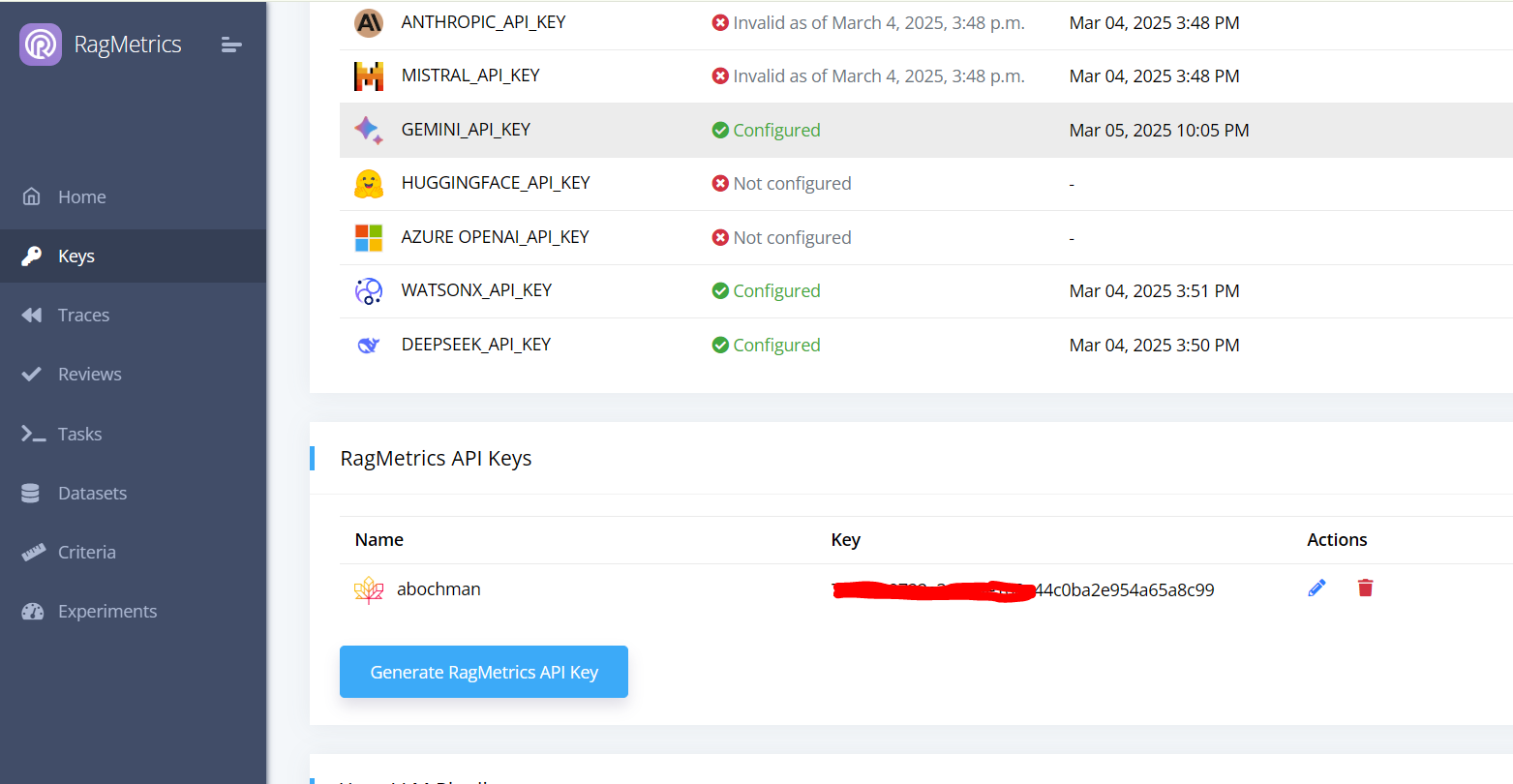
Step 2: Log a trace
Use Python code such as below to log a trace of your LLM input and output to RagMetrics
# Install dependencies (only needed in local or Colab environments)
# !pip install ragmetrics-client openai

from openai import OpenAI
import ragmetrics

# Authenticate with RagMetrics
ragmetrics.login(key="[your_ragmetrics_key]")

# Initialize the OpenAI client
openai_client = OpenAI(api_key="[your_openai_key]")

# Monitor OpenAI API calls with RagMetrics
ragmetrics.monitor(openai_client)

# Example chat completion
response = openai_client.chat.completions.create(
    model="gpt-3.5-turbo",
    messages=[{"role": "user", "content": "1 + 1 = ?"}]
)

print(response)
Notes:
- Paste your RagMetrics API key into the
keyparameter of theragmetrics.login()method or setos.environ["RAGMETRICS_API_KEY"]before callinglogin(). - Call
monitor()once and then subsequent LLM calls from this client will be logged. - The code above demonstrates how to monitor the OpenAI client, but we also support LiteLLM and LangChain clients using the same syntax.
You can now see the trace on the Traces page
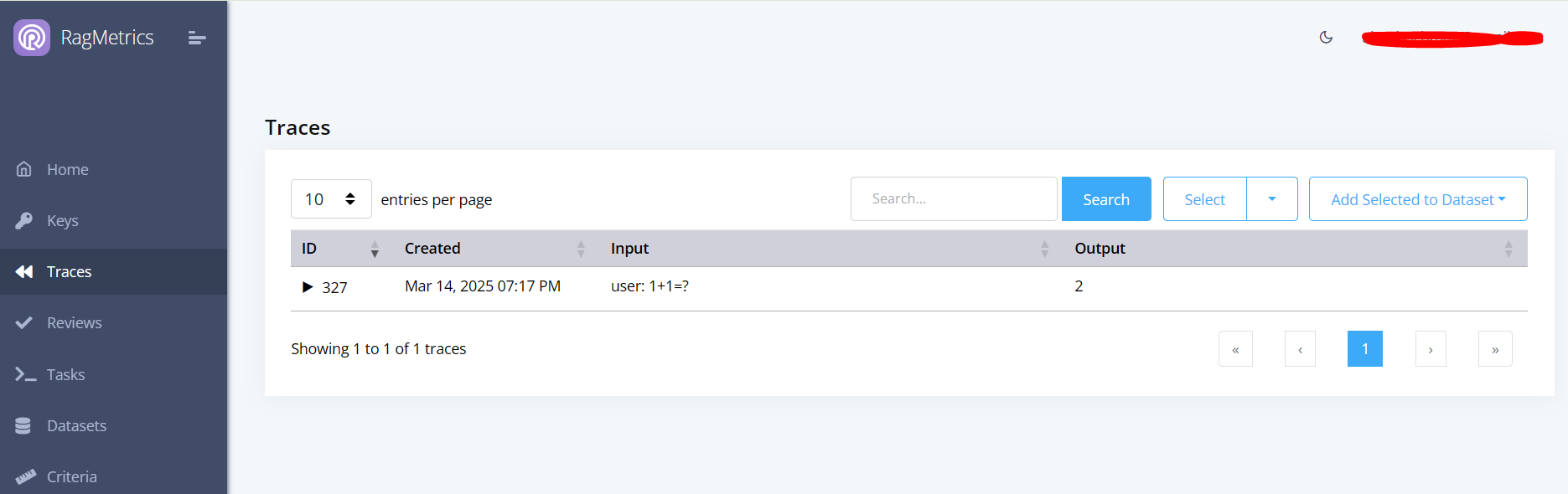
Click the triangle to expand the trace and see the details.
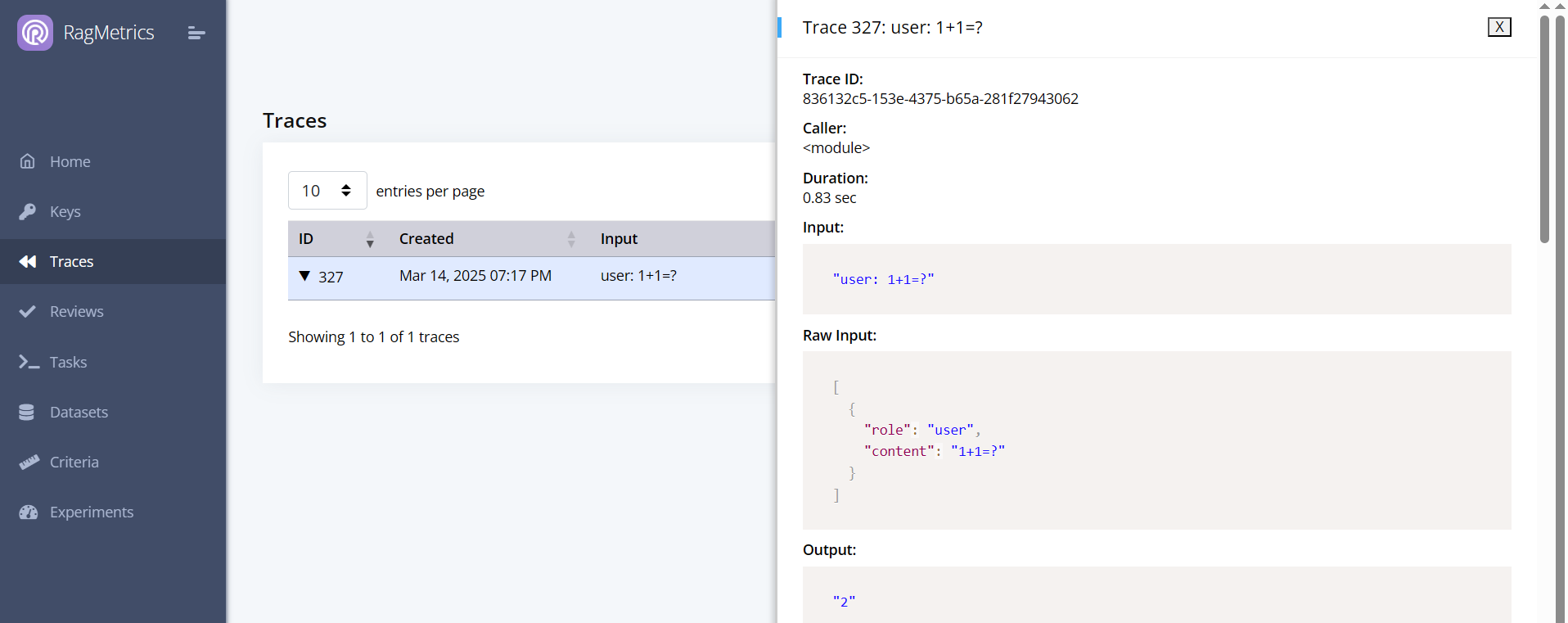
Step 3: Add metadata
You can add metadata to your traces to help you filter them later:
resp = openai_client.chat.completions.create(
    model="gpt-4o-mini",
    messages=[
        {"role": "user", "content": "2 * 2 = ?"}
    ],
    metadata={"task": "multiplication"}
)
The metadata will show up in the trace details:
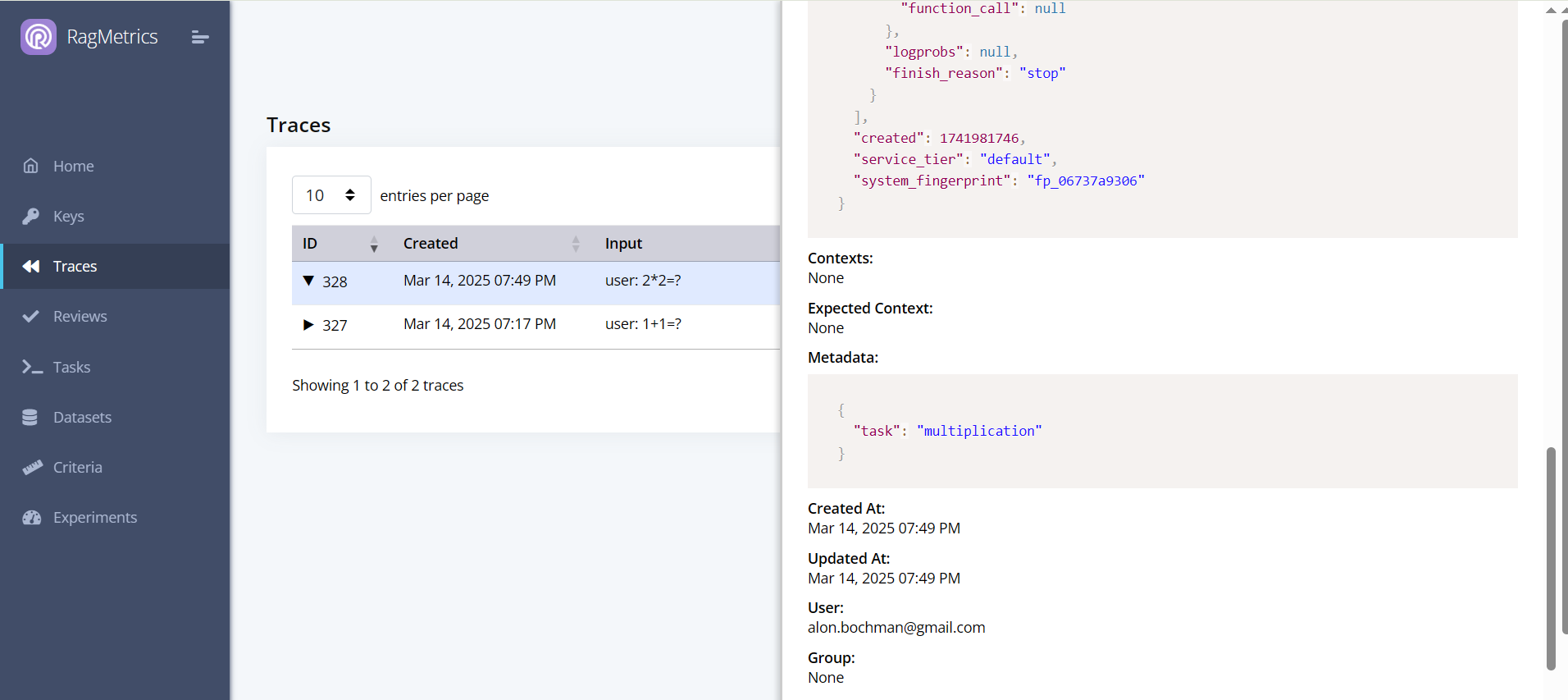
Now you can use the GUI to filter traces by metadata:

Note:
- You can also add metadata in
ragmetrics.login(). - Metadata from individual traces will supersede metadata from the login call.
Step 4: Format trace input/output
You can customize the formatting of the trace input and output using a callback. In the example below, we filter out the part of the output before the equal (=) sign.
def my_callback(raw_input, raw_output):
    # Your custom post-processing logic here
    try:
        raw_output_str = str(raw_output.choices[0].message.content)
        output = raw_output_str.split('=')[1].strip()
    except Exception as e:
        output = raw_output

    return {
        "output": output
    }


# Attach RagMetrics monitoring with the callback
ragmetrics.monitor(openai_client, callback=my_callback)

# Example OpenAI call
resp = openai_client.chat.completions.create(
    model="gpt-4o-mini",
    messages=[{"role": "user", "content": "2 * 2 = ?"}],
    metadata={"task": "multiplication"}
)
Here’s the new trace:

Notes:
- Callbacks do not erase the original raw input and output. Those are still available in the trace, in addition to the processed input and output.
- A custom callback accepts two arguments:
raw_inputandraw_output. These contain the ‘raw’ JSON from the LLM call. - The callback must return a dictionary with optional keys
inputandoutput. - If no callback is provided, our default callback flattens input messages into a string, and extracts the string content of the last output message.
Key Takeaways
In this quickstart tutorial, you learned how use the RagMetrics push API to:
- Log a trace and view it on the RagMetrics GUI
- Add metadata and filter on it
- Add custom formatting to your trace input and output using a callback
Run an experiment
You can create and run an experiment from code, rather than from the GUI. In RagMetrics, an experiment depends on a task and dataset, so we’ll need to create those first.
Step 1: Create a task
from ragmetrics import Task

# Create a new task
t1 = Task(
    name="Pig Latin",
    system_prompt="Answer in pig latin",
    generator_model="gpt-4o-mini"
)

# Save the task
t1.save()

# Print the generated task ID
print(t1.id)
After the task is saved, the task object gets a task ID. You can now see it on the Tasks page:
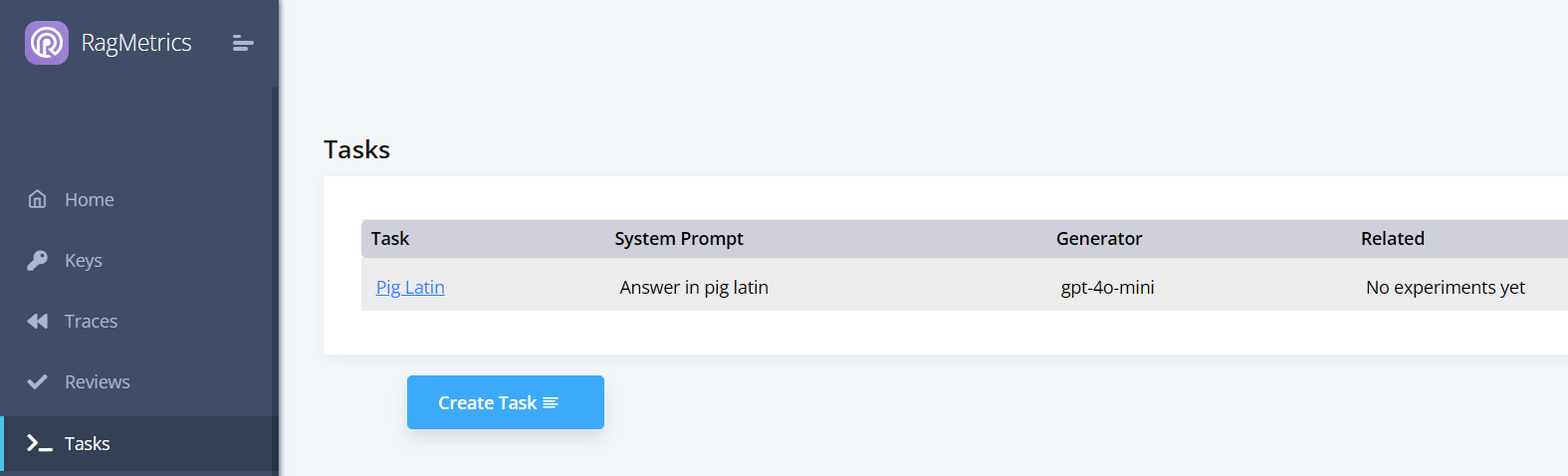
You can also download a task from RagMetrics using its ID or name:
# Download the task by ID
t2 = Task.download(t1.id)

# Alternatively, download by name
# t2 = Task.download(name="Pig Latin")

# Display task details
print("Task name:", t2.name)
print("System prompt:", t2.system_prompt)
print("Generator model:", t2.generator_model)
Step 2: Create a dataset
A RagMetrics dataset is a collection of examples. Each example contains a question, a ground truth answer, and a ground truth context.
from ragmetrics import Dataset, Example

# Create two examples
e1 = Example(
    question="What is the biggest city in the east of US?",
    ground_truth_answer="NYC",
    ground_truth_context=[
        "NYC is the biggest city in the east of US.",
        "NYC is on the eastern seaboard."
    ]
)

e2 = Example(
    question="Is it beautiful?",
    ground_truth_answer="Yes",
    ground_truth_context=["NYC is a very beautiful city."]
)

# Create a dataset and save it
d1 = Dataset(name="NYC", examples=[e1, e2])
d1.save()

# Print the dataset ID
print(d1.id)
Just like with tasks, you can download a dataset from RagMetrics using its ID or name:
# Download the dataset by ID
d2 = Dataset.download(d1.id)

# Alternatively, download by name
# d2 = Dataset.download(name="NYC")

# Display dataset details
print("Dataset name:", d2.name)
Step 3: Create an experiment
Now that we have a task and dataset, let’s create the experiment and run it:
A RagMetrics experiment consists of a list of cohorts. Each cohort represents one run through the dataset. Having two cohorts allows us to compare performance between two models, prompts or LLM pipelines, similar to an A/B test. The number of cohorts in an experiment is unlimited.
from ragmetrics import Task, Dataset, Criteria, Experiment, Cohort

# Load prerequisites: the task, dataset, and criteria
t1 = Task.download(name="Pig Latin")
d1 = Dataset.download(name="NYC")

# We'll use the off-the-shelf accuracy criterion, but you can also create your own
accuracy = Criteria(name="Accuracy")

# Define the experiment as a list of cohorts
cohort1 = Cohort(name="gpt-4o-mini", generator_model="gpt-4o-mini")
cohort2 = Cohort(name="API Demo: Stub", rag_pipeline="API Demo: Stub")

# Create the experiment
e1 = Experiment(
    name="My Experiment",
    dataset=d1,
    task=t1,
    cohorts=[cohort1, cohort2],
    criteria=[accuracy],
    judge_model="gpt-4o-mini"
)

# Run the experiment
experiment_results = e1.run()
When the experiment runs, we can see the following in the console:

Follow the link to view the experiment in the RagMetrics UI.
Step 4: Local code
In the previous step, we ran an experiment whose assets are hosted by on RagMetrics servers. By ‘assets’ we mean the task, dataset, criteria and the generator model. All of these can be hosted locally in your environment too:
Let’s start by with a local pipeline that greets our users:
def say_hi(input, cohort = None): return "Hi " + input
For simplicity, this example does not use an LLM, but it just as easily could.
This function takes two parameters:
input: The input, typically provided by the user, into your LLM pipeline.cohort: Optional JSON of A/B test switches. You can use them to compare prompts, generator models, vector databases, agentic configurations etc. More on those later.
Ragmetrics expects local functions such as say_hi to return either a string (which would be the generated answer) or a dictionary with the two keys:
generated_answer: The output of your LLM pipeline. Can be a string or JSON.contexts: Optional, list of contexts retrieved. Useful if you’d like to evaluate retrieval separately from generation. Here’s an example:
# Define example contexts
contexts = [
    {
        "metadata": {
            "source": "Source 1",
            "title": "Title for Source 1",
            # Additional metadata as needed to identify the source
        },
        "page_content": "Content for source 1"
    },
    {
        "metadata": {
            "source": "Source 2",
            "title": "Title for Source 2",
            # Additional metadata as needed to identify the source
        },
        "page_content": "Content for source 2"
    }
]

# Now that we have a local “LLM” pipeline, let’s create the other assets locally too:
# a task, dataset, and an experiment

e1 = Example(
    question="Bob",
    ground_truth_answer="Hi Bob"
)

e2 = Example(
    question="Jane",
    ground_truth_answer="Hi Jane"
)

dataset1 = Dataset(
    examples=[e1, e2],
    name="Names"
)

task1 = Task(
    name="Greet",
    function=say_hi
)

criteria1 = Criteria(name="Accuracy")

exp1 = Experiment(
    name="Naming Experiment",
    dataset=dataset1,
    task=task1,
    criteria=[criteria1],
    judge_model="gpt-4o-mini"
)

# Run the experiment
status = exp1.run()
When we run the experiment, RagMetrics will loop through the local function, once for every example in the dataset, collect the outputs and send them to the RagMetrics server for evaluation. We can watch the progress in the terminal or web UI, same as in step 3 above.
Notes:
- The Task refers to our local pipeline using the function parameter.
- We did not specify Cohorts, because we are not using any A/B test switches in this example. Ragmetrics creates a default Cohort for us.
Key Takeaways
In this quickstart tutorial, you learned how use the RagMetrics push API to:
- Create tasks and datasets
- Create and run experiments
- Review their results
Concepts
- Experiments: Experiments in RagMetrics are A/B tests, there to help you make a data-driven decision. We support three types of experiments
- Compare Models: Pick which model will give you the best results.
- Compare Prompts: Pick which prompt will give you the best results.
- Advanced: Pick a combination of models, prompts and other A/B test parameters that will give you the best results. This option is most effective when testing your own LLM pipeline. It allows you to specify cohorts (competitor groups) declaratively, using JSON. Under the hood, all experiments use this format.
- Labeled Data: The foundation for evaluating your LLM applications.
- Structure: Includes user questions, correct answers, and ground truth contexts.
- Creation: Can be uploaded via spreadsheet, generated from documents, or from web pages.
- Purpose: Used as the baseline for evaluating generated answers.
- Evaluation Criteria:
- RagMetrics judges performance using one or more criteria you select.
- Pre-built library: RagMetrics offers 209 pre-built criteria for common LLM tasks. These include accuracy, succinctness and context relevance.
- Custom criteria: Every LLM application is different. You can create your own criteria to measure performance for your LLM application.
- Phase: Criteria can be applied during generation or retrieval. To use retrieval criteria:
- Your labeled dataset must have ground truth contexts.
- You must connect RagMetrics to your own LLM pipeline.
- That pipeline must provide retrieved contexts.
- Types: Criteria can be based on an LLM judge or deterministic functions, such as regex match, JSON difference etc.
- Score: Criteria return one of two types of scores:
- Likert scale (1-5, 5 is best)
- Boolean (True or False).
- Analytics
- View Score Breakdowns: See how each question, prompt, or model performed based on the selected criteria.
- Identify Changes: See which specific questions or prompts improved or degraded between variations.
- Download Details: Download detailed results for further analysis.
- Compare: Use the results to make informed choices about your prompts, models, and other elements of your system.
API Reference
Core Methods
login(key=None, base_url=None, off=False)[source]
Authenticate with the RagMetrics API
Parameters:
- key – Optional API key, defaults to environment variable RAGMETRICS_API_KEY
- base_url – Optional custom base URL for the API
- off – Whether to disable logging
Returns:
True if login was successful
Return type:
bool
monitor(client, metadata=None, callback=None)[source]
Wrap LLM clients to automatically log interactions
Parameters:
- client – The LLM client to monitor
- metadata – Optional metadata to include with logged traces
- callback – Optional callback function for custom processing
Returns:
Wrapped client that logs interactions
trace_function_call(func)[source]
Decorator to trace function execution for tracking retrieval in RAG pipelines
Parameters:
func – The function to trace
Returns:
Traced function
Classes
Cohort
classCohort(name, generator_model=None, rag_pipeline=None, system_prompt=None)[source]
Bases: object
A class representing a group of models or pipelines to be evaluated.
A cohort defines a specific configuration to test in an experiment. It can represent either a single model or a RAG pipeline configuration. Cohorts allow comparing different setups against the same dataset and criteria.
__init__(name, generator_model=None, rag_pipeline=None, system_prompt=None)[source]
Initialize a new Cohort instance.
Note: A cohort must include either generator_model OR rag_pipeline, not both.
Example - Creating model cohorts:
# For comparing different models
cohorts = [
    Cohort(name="GPT-4", generator_model="gpt-4"),
    Cohort(name="Claude 3 Sonnet", generator_model="claude-3-sonnet-20240229"),
    Cohort(name="Llama 3", generator_model="llama3-8b-8192")
]

# For comparing different models with custom system prompts
cohorts = [
    Cohort(
        name="GPT-4 with QA Prompt",
        generator_model="gpt-4",
        system_prompt="You are a helpful assistant that answers questions accurately."
    ),
    Cohort(
        name="GPT-4 with Concise Prompt",
        generator_model="gpt-4",
        system_prompt="Provide extremely concise answers with minimal explanation."
    )
]
Example - Creating RAG pipeline cohorts:
# For comparing different RAG approaches
cohorts = [
    Cohort(name="Basic RAG", rag_pipeline="basic-rag-pipeline"),
    Cohort(name="Query Rewriting RAG", rag_pipeline="query-rewriting-rag"),
    Cohort(name="Hypothetical Document Embeddings", rag_pipeline="hyde-rag")
]
Parameters:
- name (
str) – The name of the cohort (e.g., “GPT-4”, “RAG-v1”). - generator_model (
str, optional) – The model identifier to use for generation. - rag_pipeline (
str, optional) – The RAG pipeline configuration identifier. - system_prompt (
str, optional) – Override system prompt to use with this cohort.
to_dict()[source]
Convert the Cohort instance to a dictionary for API communication.
Returns:
Dictionary containing the cohort’s configuration.
Return type:
dict
Criteria
class Criteria(
    name,
    phase='',
    description='',
    prompt='',
    bool_true='',
    bool_false='',
    output_type='',
    header='',
    likert_score_1='',
    likert_score_2='',
    likert_score_3='',
    likert_score_4='',
    likert_score_5='',
    criteria_type='llm_judge',
    function_name='',
    match_type='',
    match_pattern='',
    test_string='',
    validation_status='',
    case_sensitive=False
):
    """Criteria class definition.

    Args:
        name (str): Name of the criterion.
        phase (str, optional): Optional phase name.
        description (str, optional): Description of the criterion.
        prompt (str, optional): LLM evaluation prompt.
        bool_true (str, optional): Value representing 'true' in boolean mode.
        bool_false (str, optional): Value representing 'false' in boolean mode.
        output_type (str, optional): Output format type.
        header (str, optional): Header label for display.
        likert_score_1–5 (str, optional): Descriptions for Likert scale scores.
        criteria_type (str, optional): Type of criterion. Defaults to 'llm_judge'.
        function_name (str, optional): Linked function for evaluation.
        match_type (str, optional): Matching logic type.
        match_pattern (str, optional): Regex or pattern to match against.
        test_string (str, optional): Test string for evaluation.
        validation_status (str, optional): Validation or approval state.
        case_sensitive (bool, optional): Whether matching is case-sensitive.
    """
    pass
Bases: RagMetricsObject
Defines evaluation criteria for assessing LLM responses.
Criteria specify how to evaluate LLM responses in experiments and reviews. They can operate in two different modes:
- LLM-based evaluation: Uses another LLM to judge responses based on specified rubrics like Likert scales, boolean judgments, or custom prompts.
- Function-based evaluation: Uses programmatic rules like string matching to automatically evaluate responses.
Criteria can be applied to either the retrieval phase (evaluating context) or the generation phase (evaluating final answers).
1object_type: str = "criteria"
2
3
4def __init__(
5    self,
6    name,
7    phase='',
8    description='',
9    prompt='',
10    bool_true='',
11    bool_false='',
12    output_type='',
13    header='',
14    likert_score_1='',
15    likert_score_2='',
16    likert_score_3='',
17    likert_score_4='',
18    likert_score_5='',
19    criteria_type='llm_judge',
20    function_name='',
21    match_type='',
22    match_pattern='',
23    test_string='',
24    validation_status='',
25    case_sensitive=False
26):
27    """Initialize a Criteria object.
28
29    Args:
30        name (str): Name of the criterion.
31        phase (str, optional): Optional phase or stage name.
32        description (str, optional): Description of the criterion.
33        prompt (str, optional): Evaluation or instruction prompt.
34        bool_true (str, optional): Value representing true in boolean mode.
35        bool_false (str, optional): Value representing false in boolean mode.
36        output_type (str, optional): Expected output type.
37        header (str, optional): Header for result display.
38        likert_score_1–5 (str, optional): Labels for Likert scale scoring.
39        criteria_type (str, optional): Criterion type (default: "llm_judge").
40        function_name (str, optional): Function for programmatic evaluation.
41        match_type (str, optional): Type of pattern matching used.
42        match_pattern (str, optional): Regex or pattern to match.
43        test_string (str, optional): Example or test input string.
44        validation_status (str, optional): Validation or approval state.
45        case_sensitive (bool, optional): Whether matches are case-sensitive.
46    """
47    self.name = name
48    self.phase = phase
49    self.description = description
50    self.prompt = prompt
51    self.bool_true = bool_true
52    self.bool_false = bool_false
53    self.output_type = output_type
54    self.header = header
55    self.likert_score_1 = likert_score_1
56    self.likert_score_2 = likert_score_2
57    self.likert_score_3 = likert_score_3
58    self.likert_score_4 = likert_score_4
59    self.likert_score_5 = likert_score_5
60    self.criteria_type = criteria_type
61    self.function_name = function_name
62    self.match_type = match_type
63    self.match_pattern = match_pattern
64    self.test_string = test_string
65    self.validation_status = validation_status
66    self.case_sensitive = case_sensitive
67Initialize a new Criteria instance.
Example - Creating a 5-point Likert scale criteria:
import ragmetrics
from ragmetrics import Criteria

# -----------------------------------------------
# Login
# -----------------------------------------------
ragmetrics.login("your-api-key")


# -----------------------------------------------
# Example 1 – Creating a Relevance Criteria (Likert Scale)
# -----------------------------------------------
# Create a relevance criteria using a 5-point Likert scale
relevance = Criteria(
    name="Relevance",
    phase="generation",
    output_type="5-point",
    criteria_type="llm_judge",
    header="How relevant is the response to the question?",
    likert_score_1="Not relevant at all",
    likert_score_2="Slightly relevant",
    likert_score_3="Moderately relevant",
    likert_score_4="Very relevant",
    likert_score_5="Completely relevant"
)
relevance.save()


# -----------------------------------------------
# Example 2 – Creating a Boolean Criteria
# -----------------------------------------------
# Create a factual correctness criteria using a boolean judgment
factual = Criteria(
    name="Factually Correct",
    phase="generation",
    output_type="bool",
    criteria_type="llm_judge",
    header="Is the response factually correct based on the provided context?",
    bool_true="Yes, the response is factually correct and consistent with the context.",
    bool_false="No, the response contains factual errors or contradicts the context."
)
factual.save()


# -----------------------------------------------
# Example 3 – Creating a String Matching Criteria (Automated)
# -----------------------------------------------
# Create an automated criteria that checks if a response contains a date
contains_date = Criteria(
    name="Contains Date",
    phase="generation",
    output_type="bool",
    criteria_type="function",
    function_name="string_match",
    match_type="regex_match",
    match_pattern=r"\d{1,2}/\d{1,2}/\d{4}|\d{4}-\d{2}-\d{2}",
    test_string="The event occurred on 12/25/2023",
    case_sensitive=False
)
contains_date.save()


# -----------------------------------------------
# Example 4 – Creating a Custom Prompt Criteria
# -----------------------------------------------
# Create a criteria with a custom prompt for flexible evaluation
custom_eval = Criteria(
    name="Reasoning Quality",
    phase="generation",
    output_type="prompt",
    criteria_type="llm_judge",
    description="Evaluate the quality of reasoning in the response.",
    prompt=(
        "On a scale of 1-10, rate the quality of reasoning in the response. "
        "Consider these factors:\n"
        "* Logical flow of arguments\n"
        "* Use of evidence\n"
        "* Consideration of alternatives\n"
        "* Absence of fallacies\n"
        "First explain your reasoning, then provide a final score between 1-10."
    )
)
custom_eval.save()
Parameters:
- name (
str) – The criteria name (required). - phase (
str) – Either “retrieval” or “generation” (default: “”). - description (
str) – Description for prompt output type (default: “”). - prompt (
str) – Prompt for prompt output type (default: “”). - bool_true (
str) – True description for Boolean output type (default: “”). - bool_false (
str) – False description for Boolean output type (default: “”). - output_type (
str) – Output type, e.g., “5-point”, “bool”, or “prompt” (default: “”). - header (
str) – Header for 5-point or Boolean output types (default: “”). - likert_score_1..5 (
str) – Labels for a 5-point Likert scale (default: “”). - criteria_type (
str) – Implementation type, “llm_judge” or “function” (default: “llm_judge”). - function_name (
str) – Name of the function if criteria_type is “function” (default: “”). - match_type (
str) – For string_match function (e.g., “starts_with”, “ends_with”, “contains”, “regex_match”) (default: “”). - match_pattern (
str) – The pattern used for matching (default: “”). - test_string (
str) – A sample test string (default: “”). - validation_status (
str) – “valid” or “invalid” (default: “”). - case_sensitive (
bool) – Whether matching is case sensitive (default: False).
to_dict()[source]
Convert the criteria object to a dictionary format for API communication.
The specific fields included in the dictionary depend on the criteria’s output_type and criteria_type.
Returns:
Dictionary representation of the criteria, including all relevant
fields based on the output_type and criteria_type.
Return type:
dict
classmethodfrom_dict(data)[source]
Create a Criteria instance from a dictionary.
Used internally when downloading criteria from the RagMetrics API.
Parameters:
data (dict) – Dictionary containing criteria data.
Returns:
A new Criteria instance with the specified data.
Return type:
Criteria
Dataset
classDataset(name, examples=[], source_type='', source_file='', questions_qty=0)[source]
Bases: RagMetricsObject
A collection of examples for evaluation.
Datasets are used in experiments to test models and RAG pipelines against a consistent set of questions. They provide the questions and ground truth information needed for systematic evaluation.
Datasets can be created programmatically, uploaded from files, or downloaded from the RagMetrics platform.
object_type: str= 'dataset'[source]__init__(name, examples=[], source_type='', source_file='', questions_qty=0)[source]
Initialize a new Dataset instance.
Example - Creating and saving a dataset:
import ragmetrics
from ragmetrics import Example, Dataset

# -----------------------------------------------
# Login to RagMetrics
# -----------------------------------------------
ragmetrics.login("your-api-key")


# -----------------------------------------------
# Example 1 – Creating and Saving a Dataset
# -----------------------------------------------
# Create examples
examples = [
    Example(
        question="What is the capital of France?",
        ground_truth_context="France is a country in Western Europe. Its capital is Paris.",
        ground_truth_answer="Paris"
    ),
    Example(
        question="Who wrote Hamlet?",
        ground_truth_context="Hamlet is a tragedy written by William Shakespeare.",
        ground_truth_answer="William Shakespeare"
    )
]

# Create a dataset
dataset = Dataset(
    name="Geography and Literature QA",
    examples=examples
)

# Save to RagMetrics platform
dataset.save()
print(f"Dataset saved with ID: {dataset.id}")


# -----------------------------------------------
# Example 2 – Downloading and Using an Existing Dataset
# -----------------------------------------------
# Download dataset by name
dataset = Dataset.download(name="Geography and Literature QA")

# Or download by ID
# dataset = Dataset.download(id=12345)

# Iterate through examples
for example in dataset:
    print(f"Question: {example.question}")
    print(f"Answer: {example.ground_truth_answer}")

# Access example count
print(f"Dataset contains {len(dataset.examples)} examples")
Parameters:
- name (
str) – The name of the dataset. - examples (
list) – List of Example instances (default: []). - source_type (
str) – Type of the data source (default: “”). - source_file (
str) – Path to the source file (default: “”). - questions_qty (
int) – Number of questions in the dataset (default: 0).
Methods:
to_dict()[source]
Convert the Dataset instance into a dictionary for API communication.
Returns:
Dictionary containing the dataset name, source, examples, and quantity.
Return type:
dict
classmethodfrom_dict(data)[source]
Create a Dataset instance from a dictionary.
Used internally when downloading datasets from the RagMetrics API.
Parameters:
data (dict) – Dictionary containing dataset information.
Returns:
A new Dataset instance with the specified data.
Return type:
Dataset
__iter__()[source]
Make the Dataset instance iterable over its examples.
This allows using a dataset in a for loop to iterate through examples.
Example:
dataset = Dataset.download(name="my-dataset")

for example in dataset:
    print(example.question)
Returns:
An iterator over the dataset’s examples.
Return type:
iterator
Example
classExample(question, ground_truth_context, ground_truth_answer)
Bases: object
A single example in a dataset for evaluation.
Each Example represents one test case consisting of a question, the ground truth context that contains the answer, and the expected ground truth answer.
Examples are used in experiments to evaluate how well a model or RAG pipeline performs on specific questions.
__init__(question, ground_truth_context, ground_truth_answer)
Initialize a new Example instance.
Example:
# Simple example with string context
example = Example(
    question="What is the capital of France?",
    ground_truth_context="France is a country in Western Europe. Its capital is Paris.",
    ground_truth_answer="Paris"
)

# Example with a list of context strings
example_multi_context = Example(
    question="Is NYC beautiful?",
    ground_truth_context=[
        "NYC is the biggest city in the east of US.",
        "NYC is on the eastern seaboard.",
        "NYC is a very beautiful city."
    ],
    ground_truth_answer="Yes"
)
- question (
str) – The question to be answered. - ground_truth_context (
str or list) – The context containing the answer. Can be a string or list of strings. - ground_truth_answer (
str) – The expected answer to the question.
to_dict()[source]
Convert the Example instance into a dictionary for API requests.
Returns:
Dictionary containing the example’s question, context, and answer.
Return type:
dict
Experiment
classExperiment(name, dataset, task, cohorts, criteria, judge_model)[source]
Bases: object
A class representing an evaluation experiment.
An Experiment orchestrates the evaluation of one or more cohorts (model configurations) against a dataset using specified criteria. It handles all the complexity of coordinating the API calls, tracking progress, and retrieving results.
Experiments are the core way to systematically evaluate and compare LLM configurations in RagMetrics.
__init__(name, dataset, task, cohorts, criteria, judge_model)[source]
Initialize a new Experiment instance.
Example - Basic experiment with existing components:
import ragmetrics
from ragmetrics import Experiment, Cohort, Dataset, Task, Criteria

# -----------------------------------------------
# Example 1 – Running an Experiment with Existing Components
# -----------------------------------------------

# Login
ragmetrics.login("your-api-key")

# Download existing components by name
dataset = Dataset.download(name="Geography QA")
task = Task.download(name="Question Answering")

# Create cohorts to compare
cohorts = [
    Cohort(name="GPT-4", generator_model="gpt-4"),
    Cohort(name="Claude 3", generator_model="claude-3-sonnet-20240229")
]

# Use existing criteria (by name)
criteria = ["Accuracy", "Relevance", "Conciseness"]

# Create and run experiment
experiment = Experiment(
    name="Model Comparison - Geography",
    dataset=dataset,
    task=task,
    cohorts=cohorts,
    criteria=criteria,
    judge_model="gpt-4"
)

# Run the experiment and wait for results
results = experiment.run()
Example - Complete experiment creation flow:
import ragmetrics
from ragmetrics import Experiment, Cohort, Dataset, Task, Criteria, Example

# -----------------------------------------------
# Example 2 – Complete Experiment Creation Flow
# -----------------------------------------------

# Login
ragmetrics.login("your-api-key")

# 1. Create a dataset
examples = [
    Example(
        question="What is the capital of France?",
        ground_truth_context="France is a country in Western Europe. Its capital is Paris.",
        ground_truth_answer="Paris"
    ),
    Example(
        question="What is the largest planet in our solar system?",
        ground_truth_context="Jupiter is the largest planet in our solar system.",
        ground_truth_answer="Jupiter"
    )
]
dataset = Dataset(name="General Knowledge QA", examples=examples)
dataset.save()

# 2. Create a task
task = Task(
    name="General QA Task",
    generator_model="gpt-4",
    system_prompt="You are a helpful assistant that answers questions accurately."
)
task.save()

# 3. Create criteria
relevance = Criteria(
    name="Relevance",
    phase="generation",
    output_type="5-point",
    criteria_type="llm_judge",
    header="How relevant is the response to the question?",
    likert_score_1="Not relevant at all",
    likert_score_2="Slightly relevant",
    likert_score_3="Moderately relevant",
    likert_score_4="Very relevant",
    likert_score_5="Completely relevant"
)
relevance.save()

factual = Criteria(
    name="Factual Accuracy",
    phase="generation",
    output_type="bool",
    criteria_type="llm_judge",
    header="Is the answer factually correct?",
    bool_true="Yes, the answer is factually correct.",
    bool_false="No, the answer contains factual errors."
)
factual.save()

# 4. Define cohorts
cohorts = [
    Cohort(name="GPT-4", generator_model="gpt-4"),
    Cohort(name="Claude 3", generator_model="claude-3-sonnet-20240229"),
    Cohort(name="GPT-3.5", generator_model="gpt-3.5-turbo")
]

# 5. Create experiment
experiment = Experiment(
    name="Model Comparison - General Knowledge",
    dataset=dataset,
    task=task,
    cohorts=cohorts,
    criteria=[relevance, factual],
    judge_model="gpt-4"
)

# 6. Run the experiment
results = experiment.run()
Parameters:
- name (
str) – The name of the experiment. - dataset (
Dataset or str) – The dataset to use for evaluation. - task (
Task or str) – The task definition to evaluate. - cohorts (
list or str) – List of cohorts to evaluate, or JSON string. - criteria (
list or str) – List of evaluation criteria. - judge_model (
str) – The model to use for judging responses.
_process_dataset(dataset)[source]
Process and validate the dataset parameter.
Handles different ways of specifying a dataset (object, name, ID) and ensures it exists on the server.
Parameters:
dataset (Dataset or str) – The dataset to process.
Returns:
The ID of the processed dataset.
Return type:
str
Raises:
- ValueError – If the dataset is invalid or missing required attributes.
- Exception – If the dataset cannot be found on the server.
_process_task(task)[source]
Process and validate the task parameter.
Handles different ways of specifying a task (object, name, ID) and ensures it exists on the server.
Parameters:
task (Task or str) – The task to process.
Returns:
The ID of the processed task.
Return type:
str
Raises:
- ValueError – If the task is invalid or missing required attributes.
- Exception – If the task cannot be found on the server.
_process_cohorts()[source]
Process and validate the cohorts parameter.
Converts the cohorts parameter (list of Cohort objects or JSON string) to a JSON string for the API. Validates that each cohort is properly configured.
Returns:
JSON string containing the processed cohorts.
Return type:
str
Raises:
ValueError – If cohorts are invalid or improperly configured.
_process_criteria(criteria)[source]
Process and validate the criteria parameter.
Handles different ways of specifying criteria (objects, names, IDs) and ensures they exist on the server.
Parameters:
criteria (list or str) – The criteria to process.
Returns:
List of criteria IDs.
Return type:
list
Raises:
- ValueError – If the criteria are invalid.
- Exception – If criteria cannot be found on the server.
_build_payload()[source]
Build the payload for the API request.
Processes all components of the experiment and constructs the complete payload to send to the server.
Returns:
The payload to send to the server.
Return type:
dict
_call_api(payload)[source]
Make the API call to run the experiment.
Sends the experiment configuration to the server and handles the response.
Parameters:
payload (dict) – The payload to send to the API.
Returns:
The API response.
Return type:
dict
Raises:
Exception – If the API call fails.
run_async()[source]
Submit the experiment asynchronously.
Starts the experiment on the server without waiting for it to complete. Use this when you want to start an experiment and check its status later.
Returns:
A Future object that will contain the API response.
Return type:
concurrent.futures.Future
run(poll_interval=2)[source]
Run the experiment and display real-time progress.
This method submits the experiment to the server and then polls for progress updates, displaying a progress bar. It blocks until the experiment completes or fails.
Example:
# Create the experiment
experiment = Experiment(
    name="Model Comparison",
    dataset="My Dataset",
    task="QA Task",
    cohorts=cohorts,
    criteria=criteria,
    judge_model="gpt-4"
)

# Run with default polling interval (2 seconds)
results = experiment.run()

# Or run with a custom polling interval
results = experiment.run(poll_interval=5)  # Check every 5 seconds
Parameters:
poll_interval (int) – Time between progress checks in seconds (default: 2).
Returns:
The experiment results once completed.
Return type:
dict
Raises:
Exception – If the experiment fails to start or encounters an error.
ReviewQueue
classReviewQueue(name, condition='', criteria=None, judge_model=None, dataset=None)[source]
Bases: RagMetricsObject
Manages a queue of traces for manual review and evaluation.
A ReviewQueue allows for structured human evaluation of LLM interactions by collecting traces that match specific conditions and applying evaluation criteria. It supports both automated and human-in-the-loop evaluation workflows.
object_type: str= 'reviews'[source]__init__(name, condition='', criteria=None, judge_model=None, dataset=None)[source]
Initialize a new ReviewQueue instance.
Parameters:
- name (
str) – The name of the review queue. - condition (
str, optional) – SQL-like condition to filter traces (default: “”). - criteria (
list or str, optional) – Evaluation criteria to apply. - judge_model (
str, optional) – LLM model to use for automated evaluation. - dataset (
Dataset or str, optional) – Dataset to use for evaluation.
__setattr__(key, value)[source]
Override attribute setting to enable edit mode when modifying an existing queue.
This automatically sets edit_mode to True when any attribute (except edit_mode itself) is changed on a queue with an existing ID.
Parameters:
- key (
str) – The attribute name. - value – The value to set.
propertytraces[source]
Get the traces associated with this review queue.
Lazily loads traces from the server if they haven’t been loaded yet.
Returns:
List of Trace objects in this review queue.
Return type:
list
_process_dataset(dataset)[source]
Process and validate the dataset parameter.
Converts various dataset representations (object, ID, name) to a dataset ID that can be used in API requests.
Parameters:
dataset (Dataset, int, str) – The dataset to process.
Returns:
The ID of the processed dataset.
Return type:
int
Raises:
- ValueError – If the dataset is invalid or not found.
- Exception – If the dataset cannot be found on the server.
_process_criteria(criteria)[source]
Process and validate the criteria parameter.
Converts various criteria representations (object, dict, ID, name) to a list of criteria IDs that can be used in API requests.
Parameters:
criteria (list, Criteria, str, int) – The criteria to process.
Returns:
List of criteria IDs.
Return type:
list
Raises:
- ValueError – If the criteria are invalid.
- Exception – If criteria cannot be found on the server.
to_dict()[source]
Convert the ReviewQueue to a dictionary for API communication.
Returns:
Dictionary representation of the review queue with all necessary
fields for API communication.
Return type:
dict
classmethodfrom_dict(data)[source]
Create a ReviewQueue instance from a dictionary.
Parameters:
data (dict) – Dictionary containing review queue information.
Returns:
A new ReviewQueue instance with the specified data.
Return type:
ReviewQueue
__iter__()[source]
Make the ReviewQueue iterable over its traces.
Returns:
An iterator over the review queue’s traces.
Return type:
iterator
Task
classTask(name, generator_model='', system_prompt='')[source]
Bases: RagMetricsObject
A class representing a specific task configuration for LLM evaluations.
Tasks define how models should generate responses for each example in a dataset. This includes specifying the prompt format, system message, and any other parameters needed for generation.
object_type: str= 'task'[source]__init__(name, generator_model='', system_prompt='')[source]
Initialize a new Task instance.
Example - Creating a simple QA task:
import ragmetrics
from ragmetrics import Task

# -----------------------------------------------
# Example 1 – Creating a Basic QA Task
# -----------------------------------------------

# Login
ragmetrics.login("your-api-key")

# Create a basic QA task
qa_task = Task(
    name="Question Answering",
    generator_model="gpt-4",
    system_prompt="You are a helpful assistant that answers questions accurately and concisely."
)

# Save the task for future use
qa_task.save()


# -----------------------------------------------
# Example 2 – Creating a RAG Evaluation Task
# -----------------------------------------------

# Create a RAG evaluation task
rag_task = Task(
    name="RAG Evaluation",
    generator_model="gpt-4",
    system_prompt=(
        "Answer the question using only the provided context. "
        "If the context doesn't contain the answer, say 'I don't know'."
    )
)

# Save the task
rag_task.save()
Parameters:
- name (
str) – The name of the task. - generator_model (
str, optional) – Default model for generation if not specified in cohort. - system_prompt (
str, optional) – System prompt to use when generating responses.
to_dict()[source]
Convert the Task instance to a dictionary for API communication.
Returns:
Dictionary containing the task configuration.
Return type:
dict
classmethodfrom_dict(data)[source]
Create a Task instance from a dictionary.
Used internally when downloading tasks from the RagMetrics API.
Parameters:
data (dict) – Dictionary containing task information.
Returns:
A new Task instance with the specified data.
Return type:
Task
Trace
classTrace(id=None, created_at=None, input=None, output=None, raw_input=None, raw_output=None, contexts=None, metadata=None)[source]
Bases: RagMetricsObject
Represents a logged interaction between an application and an LLM.
A Trace captures the complete details of an LLM interaction, including raw inputs and outputs, processed data, metadata, and contextual information. Traces can be retrieved, modified, and saved back to the RagMetrics platform.
object_type: str = "trace"


def __init__(
    self,
    id=None,
    created_at=None,
    input=None,
    output=None,
    raw_input=None,
    raw_output=None,
    contexts=None,
    metadata=None
):
    """Initialize a Trace object.

    Args:
        id (str, optional): Unique identifier for the trace.
        created_at (datetime, optional): Timestamp when the trace was created.
        input (Any, optional): Processed input data.
        output (Any, optional): Processed output data.
        raw_input (Any, optional): Raw input before processing.
        raw_output (Any, optional): Raw output from the model or system.
        contexts (list, optional): List of context objects or strings.
        metadata (dict, optional): Additional metadata associated with the trace.
    """
    self.id = id
    self.created_at = created_at
    self.input = input
    self.output = output
    self.raw_input = raw_input
    self.raw_output = raw_output
    self.contexts = contexts
    self.metadata = metadata
[source]
Initialize a new Trace instance.
Parameters:
- id (
str, optional) – Unique identifier of the trace. - created_at (
str, optional) – Timestamp when the trace was created. - input (
str, optional) – The processed/formatted input to the LLM. - output (
str, optional) – The processed/formatted output from the LLM. - raw_input (
dict, optional) – The raw input data sent to the LLM. - raw_output (
dict, optional) – The raw output data received from the LLM. - contexts (
list, optional) – List of context information provided during the interaction. - metadata (
dict, optional) – Additional metadata about the interaction.
__setattr__(key, value)[source]
Override attribute setting to enable edit mode when modifying an existing trace.
This automatically sets edit_mode to True when any attribute (except edit_mode itself) is changed on a trace with an existing ID.
Parameters:
- key (
str) – The attribute name. - value – The value to set.
to_dict()[source]
Convert the Trace object to a dictionary for API communication.
Returns:
A dictionary representation of the trace, with edit_mode flag
to indicate whether this is an update to an existing trace.
Return type:
dict
classmethodfrom_dict(data)[source]
Create a Trace instance from a dictionary.
Parameters:
data (dict) – Dictionary containing trace information.
Returns:
A new Trace instance initialized with the provided data.
Return type:
Trace
%201.svg)

